DQ Connector
The Native DQ Connector brings intelligence from Collibra Data Quality & Observability into Collibra Data Intelligence Cloud. Once this integration is established, you will be able to bring in your Data Quality user-defined rules, metrics, and dimensions into Collibra Data Catalog.
Note Only data sources ingested by both Collibra Data Catalog and Collibra Data Quality & Observability can synchronize data quality assets.
Prerequisites
| Resource | Notes |
|---|---|
| Collibra Edge Site | DQ Connector is a capability of Edge |
| Collibra Data Intelligence Cloud | 2021.07 Release (or newer) |
| Collibra Data Quality | 2.15 (or newer) |
| Databases and Drivers | Proper Access and Credentials (Username / Password) |
Because the DQ Connector is an Edge capability, you must be able to ingest data via Edge. For information about enabling and configuring Edge, see the Edge Configuration guide.
Create a Collibra Data Quality & Observability Edge site
Create an Edge site with the following properties:
| Field | Description |
|---|---|
|
Name |
The name of the Edge site, for example Collibra-DQ-Edge. Do not use spaces or special characters. This field is mandatory and the name must be globally unique. |
|
Description |
The description of the Edge site. We recommend to put at least basic location information of the Edge site. This field is mandatory. |
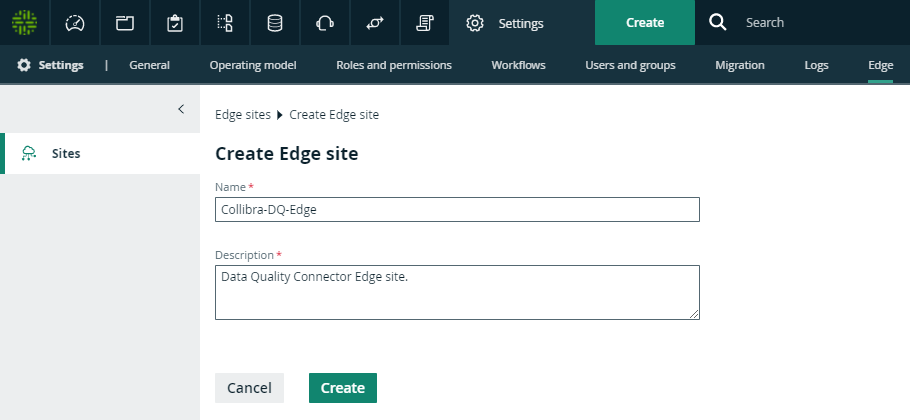
Install the Collibra Data Quality & Observability Edge site
Follow the instructions for your environment to Install an Edge site.
Note This process automatically creates an Edge user, which you use later in the setup process.
Connect to your Collibra Data Quality & Observability source
Create a connection for each Collibra Data Quality & Observability data source you want to synchronize. The following table shows the available properties and their descriptions as they appear on the :
| Section | Property | Description |
|---|---|---|
| Connection settings | ||
| Name |
The same name as the Collibra Data Quality & Observability connection name. Ensure that your connection name does not contain any white spaces, as they are not supported in Collibra DQ. Warning The connection name in Collibra Data Intelligence Cloud must be an exact match to the connection name used in Collibra DQ. |
|
| Description | The description of the JDBC connection. This field is also visible when you register content. | |
| Connection provider | The connection provider, which determines the available connection parameters. Same as Collibra Data Quality & Observability. | |
| Connection parameters | Example for Username / Password JDBC driver | |
|
|
Username | The same username as the Collibra DQ connection username. |
| Password | The same password as the Collibra DQ connection password. | |
| Driver class name | In most cases, this is the same driver name as the Collibra DQ connection driver name. If you select a different driver in Collibra Data Intelligence Cloud, the driver class name can be different from the Collibra DQ driver class name. | |
| Driver Jar |
In most cases, this is the same driver JAR file as from Collibra DQ. If you select a different driver in Collibra Data Intelligence Cloud, the driver jar can be different from the Collibra DQ driver jar. Ensure that the driver is supported in both Collibra Data Intelligence Cloud and Collibra DQ. Note Some CDATA drivers that are supported in Collibra Data Intelligence Cloud are not supported in Collibra DQ. It is best practice to use a CDATA driver in Collibra Data Intelligence Cloud, but you can use a different driver in Collibra DQ. |
|
| Connection string | In most cases, this is the same URL as the Collibra DQ connection URL. If you select a different driver in Collibra Data Intelligence Cloud, the connection URL can be different from the Collibra DQ connection URL. | |
Add ingestion capabilities to your Collibra Data Quality & Observability connection
You must add a Catalog JDBC ingestion Edge capability template for each connection you have created to extract and process data for your data source.
| Field | Description | Required |
|---|---|---|
|
Capability |
This section contains the general information about the capability. |
|
|
Name
|
The name of the Edge capability. |
|
|
Description
|
The description of the Edge capability. |
|
|
Capability template
|
The capability template, which determines the next available sections. Select the following Edge capability:
|
|
|
Connection |
This section contains information to connect to the data source. |
|
|
JDBC connection
|
|
|
|
JDBC data source type
|
The data source type of the data source that you want to ingest. |
|
|
Supports schemas
|
A text field where you have to enter True to enable database registration of data sources that have no schema. If the data source has schemas, you can ignore this field. Tip If the data source does not have a schema, Data Catalog creates a Schema asset with the same name as the full name of the database. |
|
|
Others |
This section can contain additional capability properties. Warning Adding additional properties can have a significant impact on your Edge site. Only add or update them together with Collibra Support. Note No validation is performed on the values you add. |
|
|
General |
This section contains general information about logging. |
|
|
Debug
|
An option to automatically send Edge infrastructure log files to Collibra Data Intelligence Cloud. By default, this option is set to false. Note We highly recommend to only send Edge infrastructure log files to Collibra Data Intelligence Cloud when you have issues with Edge. If you set it to true, it will automatically revert to false after 24h.
|
|
|
Log level
|
An option to determine the verbosity level of Catalog connector log files. By default, this option is set to No logging. |
|
 Yes
Yes
 No
No
 Show properties
Configure destinations for Collibra Data Quality & Observability assets
Collibra Data Quality & Observability rules, metrics and dimensions require their own domains in Data Catalog. If you don't have existing domains for data quality or wish to use new ones for the quality extraction purpose, create a domain for each type of data quality asset:
- Rules: Rulebook Domain
- Metrics: Rulebook Domain
- Dimensions: Governance Asset Domain
Assign permissions for Collibra Data Quality & Observability domains
Edge must have the correct resource permissions to manage assets inside the dedicated Collibra Data Quality & Observability domains. For each dedicated domain, assign the Technical Steward role to the Edge user.
Note The Edge user is automatically created when you install the Edge site.
Add Collibra Data Quality & Observability characteristics to assets
To show Collibra Data Quality & Observability statistics for your data source, assign the following characteristic types to the Table and Column asset types:
| Asset type | Characteristic type |
|---|---|
| Table | governed by Governance Asset |
| Column | is governed by Data Quality Rule |
Add a DQ Connector capability
The DQ Connector facilitates the communication with Collibra Data Quality & Observability. Add a DQ Connector capability to your Collibra Data Quality & Observability Edge site:
| Field | Description | Required |
|---|---|---|
|
Capability |
This section contains the general information about the capability. |
|
|
Name
|
The name of the Edge capability. |
|
|
Description
|
The description of the Edge capability. |
|
|
Capability template
|
The capability template, which determines the next available sections. Select the following capability template to ingest Collibra Data Quality & Observability user-defined rules, metrics, and dimensions into Collibra Data Catalog:
|
|
|
DQ |
This section contains information about the Collibra Data Quality & Observability connection. | |
|
Base URL
|
Your Collibra Data Quality & Observability URL |
|
|
Username
|
The Collibra Data Quality & Observability username for this connection. |
|
|
Password
|
The Collibra Data Quality & Observability password for this connection. |
|
|
Encryption options
|
Select the type of encryption to use. Default: To be encrypted by Edge management server. |
|
|
Issuer of the JWT
|
If you have selected Encrypted with public key, enter your JWT issuer. |
|
| Collibra metadata model | This section contains information about where to ingest Collibra Data Quality & Observability assets. | |
|
DQ Rules domain id
|
The UUID of the Rulebook Domain for the ingested Collibra Data Quality & Observability rules. |
|
|
DQ Metrics domain id
|
The UUID of the Rulebook Domain for the ingested Collibra Data Quality & Observability metrics. |
|
|
DQ Dimensions domain id
|
The UUID of the Governance Asset Domain for the ingested Collibra Data Quality & Observability dimensions. |
|
|
Default DQ Dimension name
|
The default Data Quality Dimension, for example Accuracy, Completeness, Consistency and so on. Default: Completeness. |
|
|
DQ Metric classified by DQ Dimension relation type id
|
The UUID of the Data Quality Metric classified by / classifies Data Quality Dimension relation. If left unspecified, this relation will not be added. |
|
|
Assets are imported in batches of this size
|
The batch size of the ingestion. Default: 5000. |
|
|
General |
This section contains general information about logging. |
|
|
Debug
|
An option to automatically send Edge infrastructure log files to Collibra Data Intelligence Cloud. By default, this option is set to false. Note We highly recommend to only send Edge infrastructure log files to Collibra Data Intelligence Cloud when you have issues with Edge. If you set it to true, it will automatically revert to false after 24h.
|
|
|
Log level
|
An option to determine the verbosity level of Catalog connector log files. By default, this option is set to No logging. |
|
To make the Collibra Data Quality & Observability metadata available in Collibra Data Catalog, you must register the data source for each Collibra Data Quality & Observability data source you want to synchronize.
Create a Data Catalog System Asset
As a prerequisite to registering a data source in Data Catalog, you must create a System asset for each connected data source with the following properties:
| Field | Value |
|---|---|
| Type | System |
| Domain | The domain to which the new assets will belong. You can only create a asset type in any domain of a domain type that is assigned to a selected asset type. |
| Name | The same name as the Collibra Data Quality & Observability connection name. |
Register the Collibra Data Quality & Observability data source in Data Catalog
To make the Collibra Data Quality & Observability metadata available in Collibra Data Catalog, you must register the data source for each Collibra Data Quality & Observability data source you want to synchronize.
Create a Data Catalog System Asset
As a prerequisite to registering a data source in Data Catalog, you must create a System asset for each connected data source with the following properties:
| Field | Value |
|---|---|
| Type | System |
| Domain | The domain to which the new assets will belong. You can only create a asset type in any domain of a domain type that is assigned to a selected asset type. |
| Name |
The same name as the Collibra Data Quality & Observability connection name. Warning Connection name must be an exact match in both Collibra DQ and Collibra Data Intelligence Cloud. For example, if your connection name is postgres-gcp in Collibra DQ, it should also be postgres-gcp in Collibra Data Intelligence Cloud. |
Register the Collibra Data Quality & Observability data source in Data Catalog
Register each Collibra Data Quality & Observability source in Data Catalog.

Extract Data Quality metadata
After you completed the DQ Connector configuration, you can start ingesting Collibra Data Quality & Observability metadata.
Prerequisites
- You have configured the metadata synchronization properties for the data source.
Steps
- Open a Database asset page.
-
In the tab pane, click
 Configuration.
 - In the Quality extraction section, do one of the following:
- To select schemas for data quality synchronization:
- Click Edit.The Data quality column becomes editable.
Select whether to synchronize the available schemas.
Click Save.
- Click Edit.
- To synchronize the selected schemas:
- Select the schema name to see its configuration.
- Click Synchronize.
The synchronization job is started for the selected schemas.
- To select schemas for data quality synchronization:
Known Limitations
- Only 1 source tenant from Collibra DQ can be specified
- On-demand ingestion (vs. scheduled)
- Can only specify 1 domain destination for each of Rules, Metrics, and Dimensions
- Only JDBC sources supported (no file sources)
FAQ
Q: DQ Dashboard In DGC: I can verify the DQ Connector is synchronizing Data Quality Rules and Data Quality Metrics, but why don't Data Quality Dashboard Charts display?
A: Ensure correct Aggregation Paths and Global Assignments (or create, if none exist) for Table and Column below.
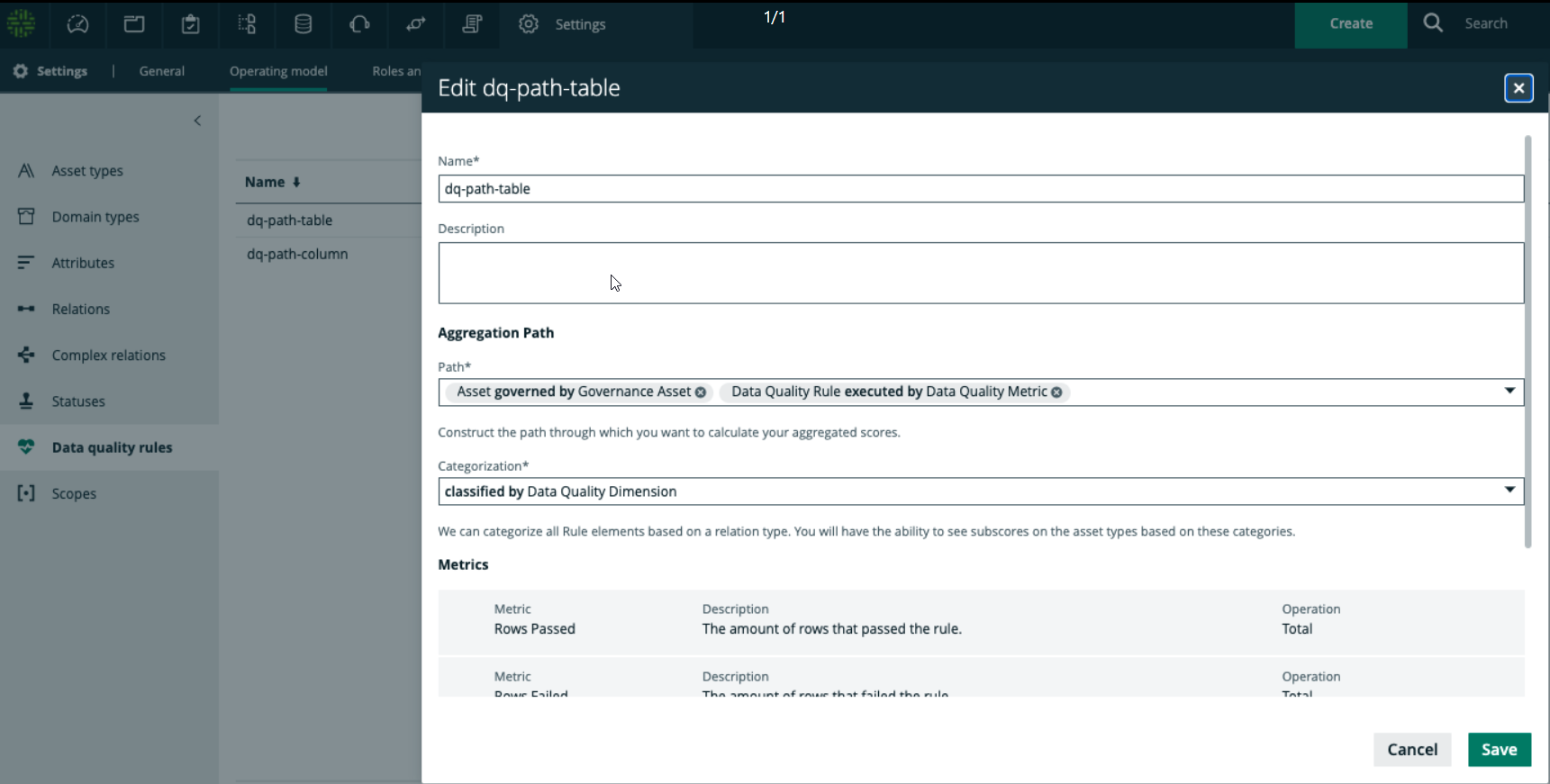

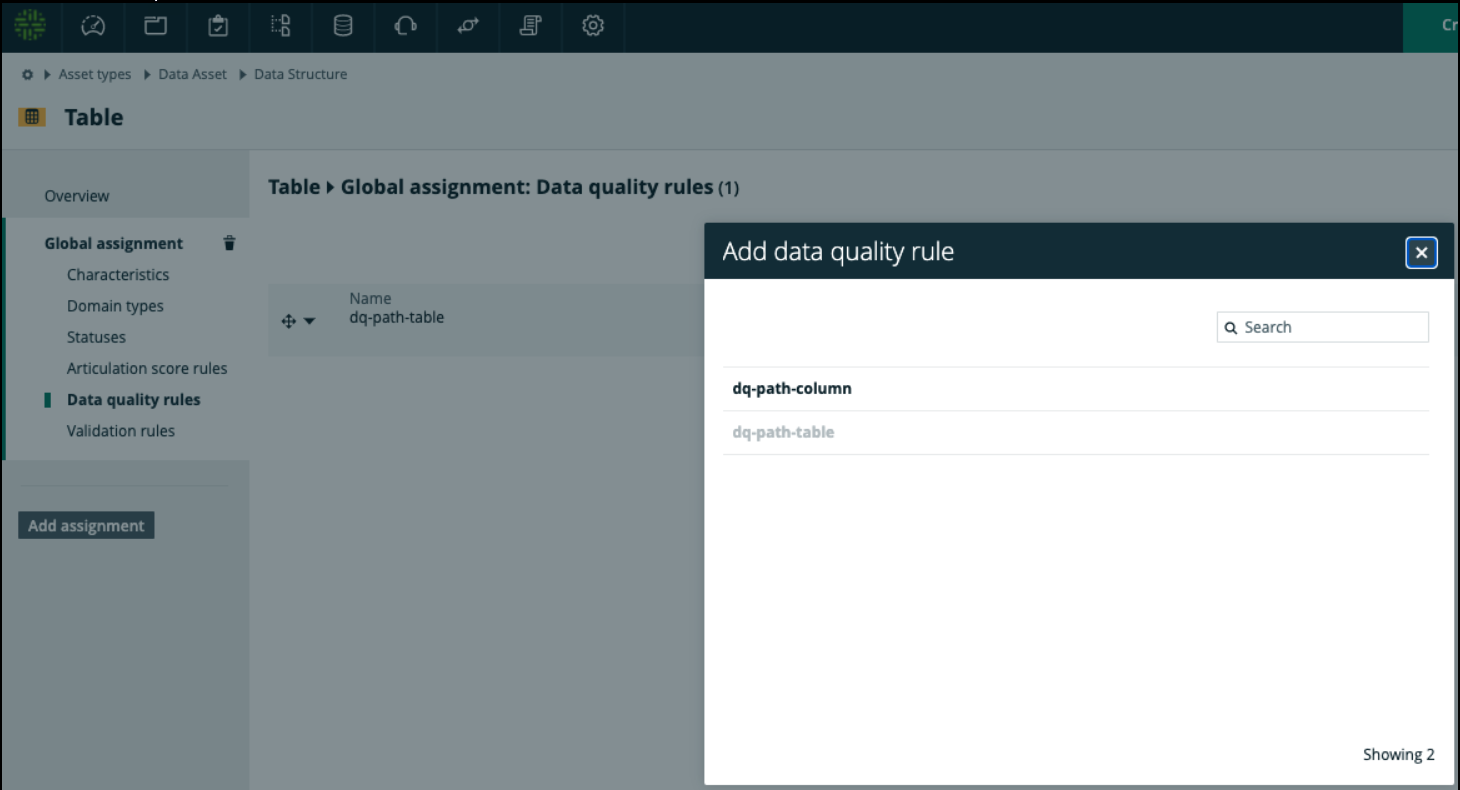
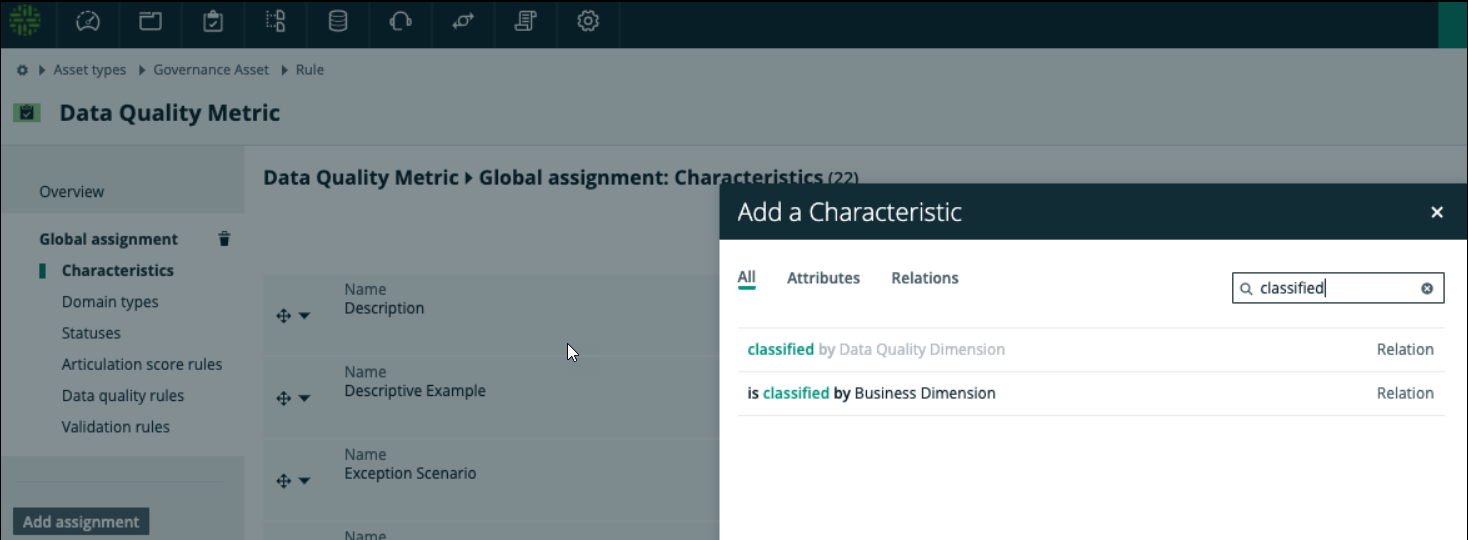
Q: DQ Dashboard In DGC: Why won't my DQ Dimension charts display in my Dashboard?
A: Please 1) add a new custom Relation 'Data Quality Metric classified by Data Quality Dimension', 2) Global Assignment for 'Data Quality Metric', 3) UUID of the new Relation into the DQ Connector setup in Step 1G, 4).


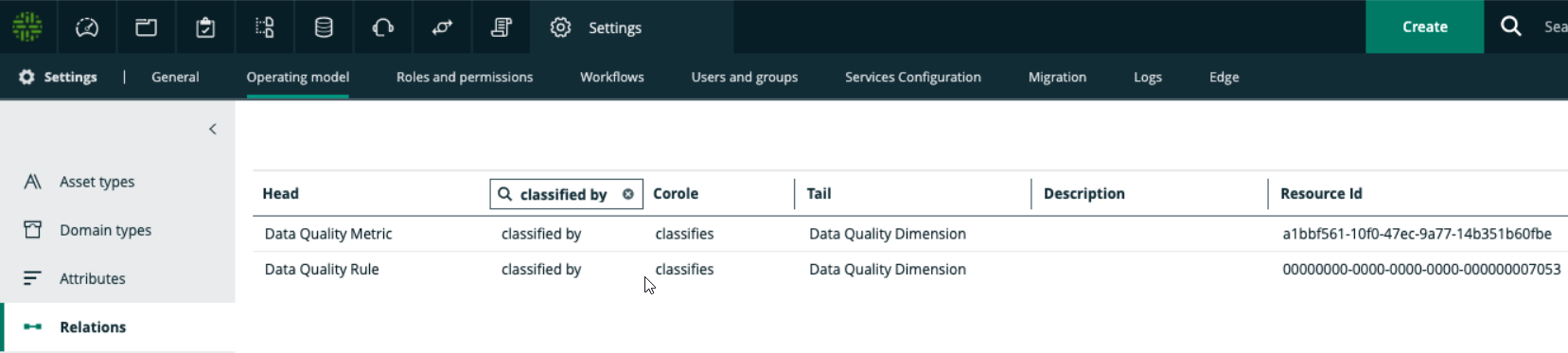
Q: I've connected and configured data sources correctly, why aren't DQ Rules and DQ Metrics being synchronized?
A: Please ensure Connection / System Names between Collibra DQ, Collibra, and Edge exactly match.
A: Please ensure Edge user has admin permissions to write the assets into Data Catalog.
A: Please ensure correct URL specified within the DQ Connector capability e.g. http://cdq.customer.com:9000/.
Q: Is DQ Connector unidirectional?
A: Yes, from Collibra DQ to Data Catalog in Collibra Data Intelligence Cloud.
Q: How many DQ Connectors can I run simultaneously?
A: Currently, one.
Q: Does the DQ Connector work with On-Prem Collibra DGC?
A: No, any work with on-prem Collibra DGC would be custom API development via Collibra Professional Services or a partner SI.
Q: If I delete a rule from Collibra DQ that I have already synchronized into Data Catalog, will it be deleted from Catalog in the next synchronization?
A: No, the DQ Connector only upserts into Data Catalog. If a rule is deleted from Collibra DQ, it will not be automatically deleted in Data Catalog.
Q: Why are my scores different in Collibra DQ and Data Catalog?
A: Currently, the DQ Connector pulls in the most recent user-defined rules from Collibra DQ. Other components that affect score such as Behaviors, Outliers, Patterns, Dupes, Source are not yet included.
Q: Getting errors when trying to delete both domain that Edge created for DB and the Connection?
A: Please delete Edge created domain via API.
Q: I've hit the synchronize button, how can I tell if my job is complete?
A: Check the Activities circle (button on top right of menu) for the status of your DQ Synchronization.
Q: Why did the rule with joins between two views that I created in Collibra DQ fail to import into Collibra Data Intelligence Cloud?
A: Because the column from the secondary view is flagged as primary, the rule maps the secondary column to the primary view. This causes the rule to import incorrectly, as the primary column does not exist as the primary view. A known workaround for this is to not select a primary column for this rule, and instead write the rule expression, including the columns required from both the primary and secondary views.